Microsoft Surface Laptop Ultra Review: Powerful AI and Gaming Hardware Faces Software Hurdles
Microsoft’s Surface Laptop Ultra aims to combine high-end gaming, software development and artificial intelligence in a single premium laptop. Built a...
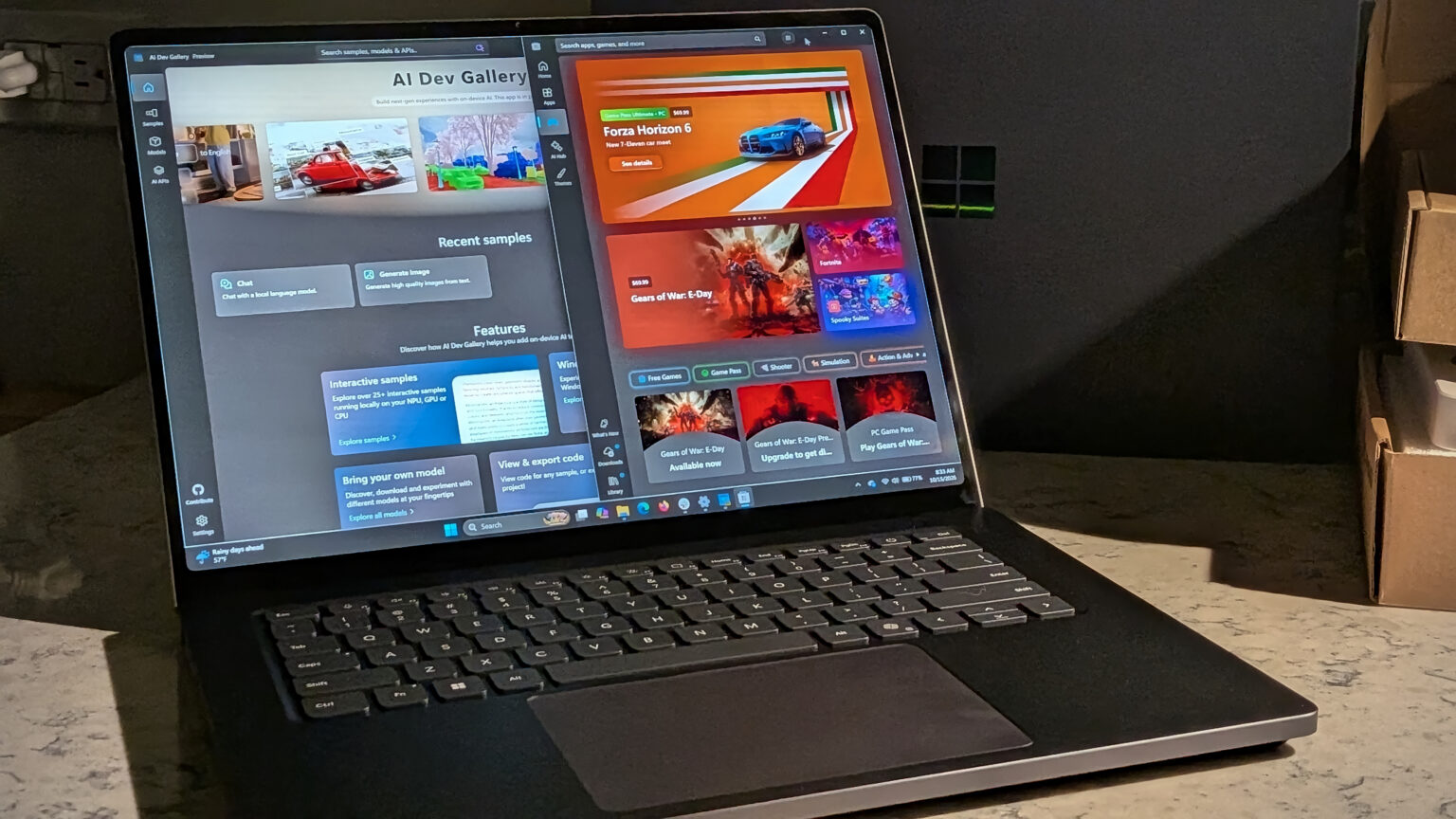
Microsoft’s Surface Laptop Ultra aims to combine high-end gaming, software development and artificial intelligence in a single premium laptop. Built around Nvidia’s new RTX Spark N1X platform, the device demonstrates that an Arm-based Windows computer can handle demanding graphics and run large AI models locally. However, software compatibility issues and its high price make it a more specialised choice than an everyday laptop.
The Surface Laptop Ultra starts at $2,599.99, with higher-end configurations costing considerably more. The top configuration can reach $5,899, placing the machine firmly in the premium segment and making performance expectations especially high.
Its central appeal is the ability to handle workloads that traditionally require separate systems. Developers can experiment with local AI models, creative professionals can use GPU-accelerated applications, and gamers can access demanding titles on the same computer. Early testing suggests the hardware is capable of delivering on much of that ambition, although the software experience has not fully caught up.
Nvidia RTX Spark Brings Desktop-Class Ambitions to a Laptop
The Surface Laptop Ultra uses Nvidia’s RTX Spark N1X system-on-chip, combining an Arm-based CPU with a Blackwell graphics processor. The base model includes an 18-core CPU and a GPU with 5,120 cores, while the reviewed configuration features a 20-core CPU and 6,144 GPU cores.
The tested version also includes 64GB of unified memory and a 1TB solid-state drive. Entry-level configurations offer 24GB of memory and 512GB of storage. Because the processor and graphics hardware share memory, the amount available becomes particularly important when running large AI models or modern games.
Testing demonstrated that the laptop could run a 70-billion-parameter language model locally and handle demanding games. These capabilities could appeal to developers and power users who want to experiment with AI without relying entirely on cloud-based services.
The hardware's performance is not equally impressive in every workload, however. Conventional CPU benchmarks did not establish it as a clear leader, and the unusual architecture created difficulties for some AI benchmarking software.
A Premium Display and Practical Design
The laptop's 15-inch mini-LED touchscreen is one of its strongest features. It offers a resolution of 3,270 × 2,180 pixels, a dynamic refresh rate of up to 120Hz and peak brightness of 2,000 nits. These specifications make it suitable for gaming, video playback and detailed creative work, although the glossy screen can reflect light in bright environments.
Microsoft has also included a comfortable keyboard, a large precision trackpad and a selection of ports, including USB-C/USB4, USB-A, HDMI 2.1b, an SD card reader and a headphone jack.
A magnetic USB-C charging connection adds convenience by allowing the cable to detach if it is pulled accidentally. The laptop weighs approximately 2kg, so it is portable but heavier than many thin-and-light notebooks.
AI Software Is Still Catching Up
The largest weakness is the gap between the machine's hardware capabilities and the software currently available to use them.
Microsoft's AI Dev Gallery, designed to help users experiment with models locally, remains in preview. Several conversational models run through the CPU rather than taking full advantage of the powerful graphics processor. Some image-generation tasks can use GPU acceleration, but the available tools are not yet consistently straightforward.
Testing with the 70-billion-parameter Llama 3.3 model through Ollama achieved approximately 6.26 tokens per second while using about 43GB of memory. This demonstrates that large models can run locally, but performance depends on the workload and available software support.
Microsoft's planned Copilot+ features, including Recall and Click to Do, were not ready for the laptop at the time of testing. Full support was expected in late 2026 or early 2027. Compatibility gaps also affected some GPU-accelerated development and video-encoding workflows.
Gaming Performance and Battery Life
Gaming is another area where the Surface Laptop Ultra makes a strong impression. Its Blackwell graphics hardware supports Nvidia DLSS and ray tracing, and demanding titles ran on the Arm-based system during testing. However, compatibility is not universal, particularly for games that depend on specialised anti-cheat systems or drivers.
Battery performance depends heavily on usage. During a three-hour mixed-use test, the laptop retained 66% charge. GPU-intensive AI work caused a noticeably faster decline, suggesting that users running large models for extended periods should expect to recharge more frequently.
Is the Surface Laptop Ultra Worth Its Price?
The Surface Laptop Ultra offers an unusual combination of local AI computing, gaming and premium laptop design. Its starting price of $2,599.99 makes it difficult to recommend to users who mainly browse the web, work with documents or use standard productivity applications.
For developers working with Nvidia's CUDA ecosystem and professionals who need portable access to large AI models, the hardware could be compelling. Other buyers may benefit from waiting until drivers, applications and Windows AI features become more mature.
The device shows how much potential high-performance Arm laptops now have. Whether that potential translates into a broadly useful everyday computer will depend on how quickly Microsoft and its software partners close the remaining compatibility gaps.
Related Stories

Reader comments are moderated as per Daily News Axis editorial standards.